Becoming a seller on Amazon sounds complicated — GST, listing, shipping, everything at once. But if you understand it step-by-step, how to sell products on Amazon isn’t as hard as it seems.
I’ve seen many first-time sellers who don’t even start out of fear of documentation. Honestly, once it’s set up, the rest of the process is manageable.
What Do You Need To Start Selling On Amazon
Quick answer: to create an Amazon seller account you need a GST number, bank account, and PAN card — without these you can’t complete seller registration, no matter how good the product is.
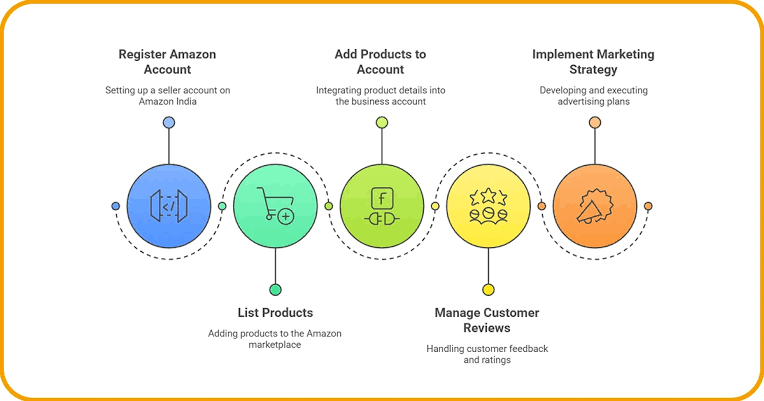
Step 1: Create A Seller Account
Go to Amazon Seller Central and create an account. There are two options — Individual or Professional. If you’re planning to sell in bulk, a Professional account will be better since there’s no per-item fee.
Step 2: Keep Your Documents Ready
- GST Registration Certificate
- PAN Card
- Bank Account Details (cancelled cheque)
- Address Proof
You can sell in some categories (like books) even without GST, but most categories require it.
Step 3: Create Your Product Listing
This is the most important part. A good listing has:
- Clear, high-quality photos (minimum 5-7 angles)
- Title with the main keyword and key features
- Bullet points with product benefits
- Detailed description with specifications
Understand Your Pricing Strategy
Featured answer: pricing on Amazon isn’t just cost + profit — you should set your price considering Amazon’s fees (referral fee, closing fee, shipping fee), competitors’ pricing, and customer price expectations, all three.
Too low a price eats into margin, too high a price reduces sales. Finding the balance is necessary.
FBA Or Self-Ship — What To Choose
FBA (Fulfillment by Amazon): Amazon stores and ships your products. Faster delivery, you get the Prime badge, but fees are higher.
Self-Ship: You handle packaging and shipping yourself. Lower fees, but delivery time is longer and customer experience can be a bit inconsistent.
[link to related guide on how to start an online store here]
Take Care Of Reviews And Ratings
Reviews are the biggest trust factor on Amazon. Keep product quality consistent, and politely ask customers for reviews (following Amazon’s guidelines — giving direct incentives isn’t allowed).
Increase Visibility Through Advertising
Sponsored Products ads can bring your listing to the top for relevant searches. Start with a small budget (₹500-1000/day) and scale based on data.
[link to related article on how to file gst returns here]
FAQs
Q: Is GST necessary to become a seller on Amazon? Yes for most categories, but some categories (like unbranded books) can be exempt.
Q: How much are Amazon FBA fees? This depends on product category and size, generally around 15-20% total fees (referral + fulfillment).
Q: How many days does it take to get the first sale on Amazon? This depends on listing quality, pricing, and advertising. Some sellers get it within the first week, some may take a month.
Q: Which is better for selling — Amazon or Flipkart? Both have their own audience. Many sellers sell on both platforms in parallel to diversify risk.
Q: What to do if a negative review comes on Amazon? Politely contact the customer, try to resolve the issue, and respond professionally through Amazon.
Conclusion
How to sell products on Amazon — the process is straightforward when you follow the steps: create an account, keep documents ready, make a good listing, and keep pricing right. Set up your Amazon Seller Central account today and list your first product.
Suggested Image Alt Text:
- “Amazon seller central dashboard on laptop”
- “product packaging ready for Amazon FBA shipment”
- “seller checking product reviews and ratings on Amazon”